Introduction
To ensure your website loads quickly and performs efficiently, it’s crucial to optimize your images. By following these best practices, you can significantly improve your page load speed and results in Page Speed Insights or GTMetrix.
Step-by-Step Guide
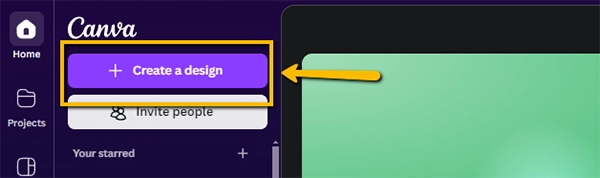
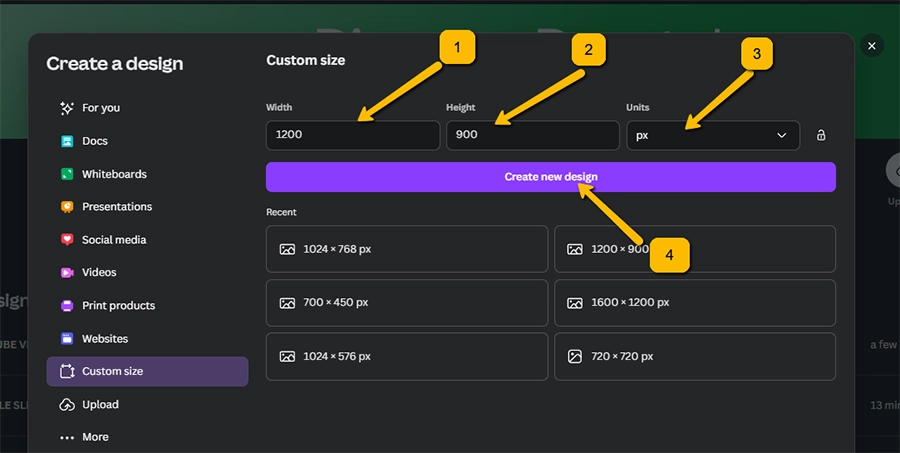
1. Create a New Design:
- Open Canva and click on “Create a new design.”
- Select the desired dimensions for your image. For most purposes, a 1200 x 900 pixel size works well.
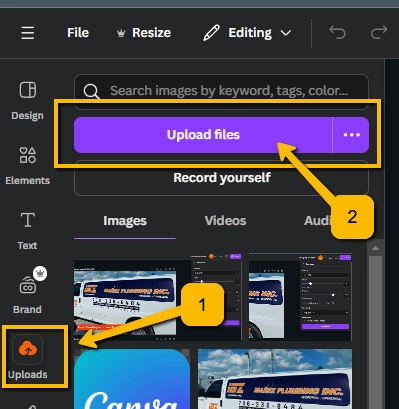
2. Upload Your Image:
- Click on the “Uploads” button.
- Select the image you want to optimize from your device.
3. Position and Crop Your Image:
- Drag and drop your image onto the canvas.
- Position the image so that the most important part is visible.
- Remember, Canva will crop your image to fit the design, so ensure the key elements are centered.
4. Download the Optimized Image:
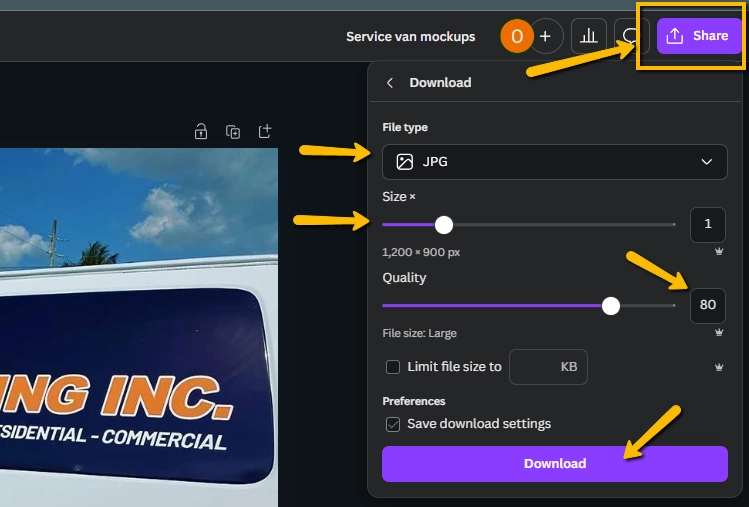
- Click on the “Share” button.
- Select “Download.”
- Choose the JPEG format.
- Set the quality to 80% to balance image quality and file size.
- For best results, aim for a file size of 100 KB or below for optimal web performance.
- Click “Download” to save the optimized image to your device.
Tips for Optimal Image Optimization
- File Size: Smaller file sizes lead to faster loading times. Aim for a balance between image quality and file size.
- Image Format: WebP is the recommended format for web use as it offers high quality with smaller file sizes. Use PNG for images requiring transparency and JPEG for general use. While WebP format is not available in canva you may save it as JPEG and convert it to any 3rd party converter like: https://www.freeconvert.com/jpg-to-webp
- Image Resolution: Ensure your image has a sufficient resolution to avoid pixelation when resized or cropped.
- Color Profile: Use sRGB color profile for web and digital designs.